ECtools designs a structure that has been modelled and analysed in ETABS or in SCIA Engineer. The mode is selected in General Options (Analysis Software). This page lists what the analysis model needs and how ECtools reads it.
ETABS: what the model needs
- Units kN-m. On the API route ECtools sets kN-m during the import and restores the original units of the model afterwards.
- RC materials with f'c, fy and fys. The steel grade is read from the last four characters of the material name (S220, B400, S400 or S420; any other ending is read as B500), so existing concrete can be named e.g. B160S220.
- Masonry materials entered as concrete materials: fm in the f'c field, fvko in the fy field, and the smaller of 0.065·fb and fvk,lim in the fys field.
- Rigid or semi-rigid diaphragms at the floor levels.
- A response spectrum analysis, for the natural periods and the diaphragm displacements.
- RC walls defined as Piers (line or area elements, or both). Masonry areas are Piers and the intermediate RC beams Spandrels.
- Beam and column sections: rectangular, T-, L-, U- or circular. Arbitrary column sections are made in ETABS Section Designer.
- Optionally, accidental eccentricity as floor torques in separate static load cases, or in the spectrum of each direction.
A concrete frame that ETABS orients as a brace is designed as a column over its own length. Frame objects assigned to a pier are ignored, with a warning: the pier is designed from its wall section.
ETABS: reading the model through the API
ETABS 19 to 23 are read directly from the running ETABS. This is the default route, Etabs v2019+ (API) in the drop-down ETABS version of the Run design window.
- Open the model in ETABS, analyse it and lock it.
- Open Run design and select Etabs v2019+ (API).
- Pick the model in the list of models open in ETABS: green is analysed and locked, red is not ready, grey belongs to another Windows session or user and cannot be selected. Open a model in ETABS... starts the matching ETABS with a model from disk.
- Press Start.
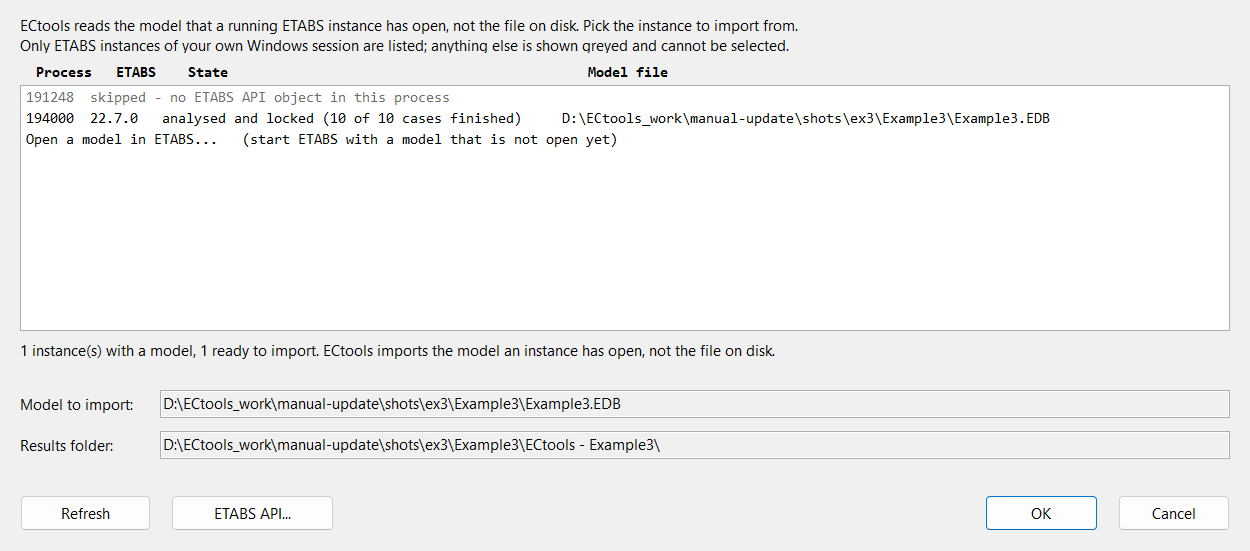
- If the model is not analysed, ECtools offers to run the ETABS analysis.
- ETABS API... shows and changes the registration of the ETABS API. It is per user and needs no administrator rights; ECtools checks it before connecting.
- The results and the files of a model (.etp, .wal, .mas, .sd) are stored in the folder
ECtools - <model name>beside the .EDB file.
The older routes remain available: an XML file exported from ETABS 2013-2016, and the text files of ETABS v9.x.
Load cases and combinations
Before the import (API route) the window Load cases and combinations assigns the load cases to their roles: Dead load (G), Live load (Q), Seismic load x and y, Eccentricity x and y, and the thermal cases DT summer and DT winter. The cases and combinations to be designed are ticked as Gravity, Seismic or Thermal SLS.
ECtools forms the load combinations itself from the load cases, which is considerably faster than reading them from ETABS. The combinations are verified against ETABS on sample members; one that differs or cannot be formed (e.g. with P-delta cases) is read from ETABS instead.
ETABS model data
The window ETABS model data (navigator, or File → ETABS model data...) works at any time, without a design run. It has four pages:
- Labels (drawing names): stores the drawing names of beams and columns in the ETABS model as <storey>|<drawing name> (e.g. STORY3|K1), so that they travel with the .EDB file.
- Model data: keeps the ECtools files (wall .sd sections, Relabel.txt, existing reinforcement tables, project settings) inside the ETABS model.
- Seismic cases: adds the static cases EXSTAT and EYSTAT, and the eight nonlinear cases for nonlinear foundation springs.
- Log.
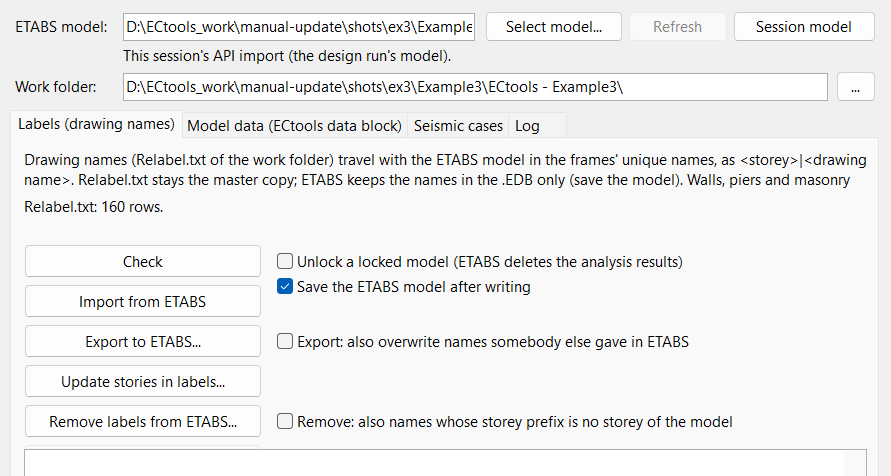
Drawing names that differ from the model names (e.g. Δ10, which cannot be entered in ETABS) are kept in the file Relabel.txt of the work folder. With the option Relabel of the General Options, the Relabel window opens during the run to enter them.
SCIA Engineer
ECtools reads projects saved by SCIA Engineer 24, 25, 26 and 2027. The version that saved the project must be installed; ECtools chooses it automatically, also when a newer version is installed beside it. A project of an earlier version must first be calculated and saved in SCIA Engineer 24 or above, or ECtools offers to convert a copy of it.
- The project must be in Eurocode mode (any National Annex), with correct storey elevations.
- Slabs are 2D plate members; beams connected to slabs are ribs.
- Walls use Wall (80) elements only, one element per storey height; openings use the opening feature, and end columns the subregion option.
- Masonry piers are wall elements and spandrels shell elements.
- The model is analysed with a response spectrum analysis.
Calculate and save the project (.esa) and close it in SCIA Engineer: an open project is locked and cannot be read. ECtools never carries out the calculation. It reads the saved project directly, with no SCIA Engineer plugin, and stores its work folder ECtools - <model name> next to the .esa file, and also inside the .esa file, so that a project sent to a colleague carries its sections and settings.
ECtools recognises storeys, walls, piers and columns automatically. File → SCIA import settings... shows this recognition (storeys, members, piers, columns) and allows it to be corrected; the SCIA model itself is never changed.